Car rental desks, traffic checkpoints, insurance portals, and fleet management systems all share the same bottleneck: manually reading an Egyptian driver license and typing the data into a form. It takes 2–3 minutes per customer, introduces errors, and does not scale. SignMe eliminates it with a single API call.
What Is Egyptian Driver License OCR?
Egyptian Driver License OCR is the automated extraction of all structured fields from an Egyptian driving license — license number, holder name in Arabic and English, date of birth, issue and expiry dates, license class codes, and the embedded national ID number — using a single REST API call. The response is a typed JSON object, ready to use in your application without post-processing.
SignMe uses the same endpoint for all Egyptian document types. Pass
ID_type=0 for driver licenses, and the API handles the rest.
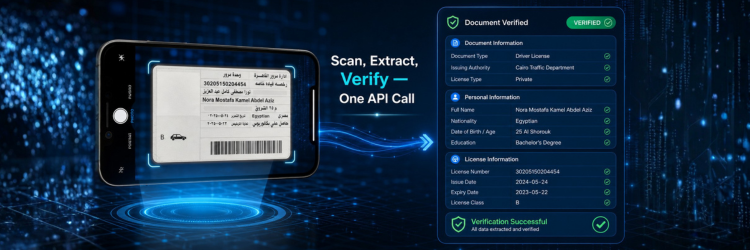
Challenges in Reading Egyptian Driving Licenses
Arabic and dual-language layout
Like National IDs, Egyptian driver licenses present fields in both Arabic and English on the same card. Generic OCR engines process the card as a flat image and routinely misread RTL Arabic text, merge field boundaries, or return only the English side — leaving the Arabic name and address fields empty. For systems that must match against Arabic-language databases, this is not a recoverable error.
Multiple license classes on one card
Egyptian licenses can carry multiple vehicle class endorsements simultaneously — for example, a holder authorised for motorcycles (A), private cars (B), and light trucks (C) will have all three printed in a small, dense area of the card. Extracting class codes accurately requires a model that understands the specific layout of this section, not a general text extractor.
Field conditions degrade image quality
Driver licenses are scanned in car rental offices, roadside checkpoints, and insurance branches — often under poor lighting, at a slight angle, or on a mobile device camera. Cards that have been in a wallet for years accumulate wear and creasing. A production API must handle all of this without surfacing partial extractions as successful results.
How SignMe API Solves This
SignMe is purpose-trained on Egyptian driving licenses. It does not apply a generic document model to the problem. Key capabilities:
- Native bilingual extraction — Arabic and English fields are returned separately in every response.
- Multi-class detection — all license class codes are returned as a structured array, not a single string.
- Expiry date in ISO 8601 — directly comparable to
Date.now()without any parsing logic in your application. - Embedded national ID extracted — the national ID number printed on Egyptian licenses is parsed and returned as a separate field.
- Confidence score per response — flag low-confidence results before they reach your business logic.
- Under 400ms average — fast enough for synchronous flows at the point of service.
See credit bundles and pricing for all plan options.
Example API Response
A representative response for an Egyptian driver license scan
(ID_type=0):
{
  "status": "success",
  "data": {
    "license_number": "12345678",
    "full_name":      "محمد أحمد السيد",
    "full_name_en":   "Mohamed Ahmed El-Sayed",
    "birth_date":     "1985-06-15",
    "issue_date":     "2020-03-10",
    "expiry_date":    "2025-03-10",
    "license_class":  ["A", "B"],
    "governorate":    "Giza",
    "national_id":    "28506151234567"
  },
  "confidence":       0.97,
  "credits_used":     1,
  "response_time_ms": 287
}
license_class is always an array — a holder with a single class
returns ["B"]. expiry_date is ISO 8601 so your
application can compute isExpired = new Date(data.expiry_date) < new Date()
with no additional parsing. Failed calls are not charged.
How to Integrate in 3 Steps
- 1Get your API keyCreate a free account. Free tier includes 100 API calls — enough to build and test a complete integration. No credit card required.
- 2POST the license imageSend a
multipart/form-dataPOST with your API key in theAuthorizationheader andID_type=0to identify the document as a driver license or National ID front. - 3Use the structured responseRead the typed JSON fields directly. No regex, no layout parsing, no field mapping. The response is ready for your database or business logic as-is.
curl -X POST \
  "https://webapi.signme.it/api/v2/SignMeAPI/uploadImage?ID_type=0" \
  -H "Authorization: Bearer YOUR_API_KEY" \
  -H "Content-Type: multipart/form-data" \
-F "file=@/path/to/license.jpg"import requests
with open("license.jpg", "rb") as f:
response = requests.post(
"https://webapi.signme.it/api/v2/SignMeAPI/uploadImage",
params={"ID_type": 0},
headers={"Authorization": "Bearer YOUR_API_KEY"},
files={"file": f}
)
data = response.json()["data"]
print(data["license_number"]) # "12345678"
print(data["full_name_en"]) # "Mohamed Ahmed El-Sayed"
print(data["expiry_date"]) # "2025-03-10"
print(data["license_class"]) # ["A", "B"]
# Check expiry in one line
from datetime import date, datetime
is_valid = datetime.fromisoformat(data["expiry_date"]).date() >= date.today()Full code examples in JavaScript, C#, and Dart are in the API documentation.
Use Cases
Car Rental Customer Verification
The most direct use case. At the rental counter, the agent scans the customer's license, SignMe extracts all fields in under 400ms, and the system automatically verifies the license class matches the booked vehicle category, flags expired licenses before keys are handed over, and pre-populates the rental agreement — with zero manual typing. End-to-end processing takes under two seconds.
Insurance Policy Onboarding
Motor insurance applications require driver details that exactly match government records. Manually entered data introduces discrepancies that delay policy issuance or cause claims complications later. SignMe extracts the license number, holder name, and class directly from the card — the same data the insurance regulator holds — eliminating the mismatch at source.
Traffic Enforcement and Fleet Management
Traffic authorities and fleet operators scanning large volumes of licenses need bulk extraction capability. SignMe supports concurrent requests and returns structured data that feeds directly into violation databases, fleet registries, and driver monitoring dashboards. For high-volume deployments, see enterprise options.
Identity Verification in Onboarding Flows
Egyptian driver licenses carry the holder's national ID number, making them a secondary identity document that can confirm or cross-reference National ID data. Banks, fintechs, and government portals use this to perform a secondary identity check within a single API call. See all use cases for details.
Accuracy and Performance
| Metric | Value |
|---|---|
| Field extraction accuracy | 99%+ |
| Average response time | < 400ms |
| Uptime SLA | 99.9% |
| Supported formats | JPEG · PNG · PDF |
| Multi-class license support | Yes — returned as array |
| Failed-call billing | Not charged |
| Confidence score | Included, per response |

Frequently Asked Questions
License number, full name in Arabic and English, date of birth, issue date, expiry date, license class codes (as an array), governorate, and the embedded national ID number printed on the card.
Yes. All class endorsements printed on the card are extracted
and returned as an array. A license carrying classes A, B, and
C simultaneously returns ["A", "B", "C"].
Yes. Car rental companies scan customer licenses at the counter, verify the expiry date and license class, and auto-populate rental agreements — all within a single API call, typically completing in under two seconds end to end.
99%+ accuracy on clean, undamaged cards under standard lighting. The model is trained specifically on Egyptian driving licenses and handles the dual-language layout natively — Arabic name extraction is not an afterthought.
SignMe extracts all fields regardless of expiry status and returns
expiry_date in the response. Your application logic
decides whether to accept or reject it — SignMe does not enforce
validity rules.
Yes. For traffic authorities, fleet operators, and insurers with data sovereignty requirements, SignMe offers on-premise deployment. Data never leaves your infrastructure. Contact the enterprise team for deployment details.
Start Building
Scan Egyptian driver licenses in minutes
Free tier includes 100 API calls — enough to build and test a full integration.
No credit card required. Live in under five minutes.
Already have an account? Sign in →