Building ID verification for Egypt? Every developer hits the same wall: generic OCR engines return garbage on Arabic documents, and manual data entry doesn't scale. This is the guide to doing it right — with a purpose-built API, real code, and a working integration in under five minutes — powered by SignMe.
What Is Egyptian National ID OCR?
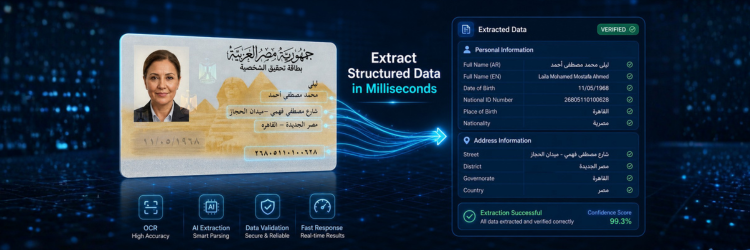
Egyptian National ID OCR is the automated extraction of structured data fields from scanned or photographed Egyptian National ID cards. The output is a typed JSON object containing every field on the card — national ID number, full name in Arabic and English, date of birth, gender, governorate, address, religion, and marital status — ready to use in your application without any manual parsing or data entry.
Unlike generic document OCR, a purpose-built Egyptian ID API understands the specific layout, the dual-language structure, and the encoding conventions used on Egyptian government-issued documents.
Why Traditional OCR Fails with Egyptian IDs
Arabic is right-to-left and context-sensitive
Most OCR engines are trained predominantly on Latin-script documents. Arabic characters change shape depending on their position within a word — a letter at the start of a word looks different from the same letter at the end. Diacritical marks further alter character recognition. An engine not specifically trained on Arabic will produce garbled output or silently drop fields.
The Egyptian ID layout is bilingual
Egyptian National IDs present fields in both Arabic and English on the same card. A generic engine processes the card as a flat image and typically confuses field boundaries, merges lines across languages, or ignores the Arabic side entirely. You end up with partial data and no reliable way to know what was missed.
The 14-digit national number has internal structure
Egypt's national ID number encodes the holder's birth century, birth date, governorate, sequential registration number, and a checksum. Extracting the raw digits is only half the job — validating the structure and decoding the embedded fields requires logic that no off-the-shelf OCR library provides.
Real-world images are imperfect
Cards photographed under fluorescent lighting, slightly rotated, or with glare will break a fragile OCR pipeline. Older cards have faded print. Damaged cards have missing corners. A production-grade API needs to handle all of this gracefully — and tell you when it can't, without charging you for the failed call.
How SignMe API Solves This
SignMe is purpose-built for Egyptian identity documents. It is not a generic OCR engine with Arabic support bolted on — it is a model trained specifically on Egyptian National IDs, Driver Licenses, Car Licenses, and Passports.
- 99%+ field-level accuracy on standard, undamaged cards under normal lighting.
- Under 400ms average response time including image decoding, extraction, and JSON serialisation.
- Arabic and English output for every applicable field — no post-processing required.
- Clean typed JSON — dates are ISO 8601, strings are UTF-8, confidence score is per-response.
- Four document types under a single endpoint: National ID (front/back), Driver License, Car License, Passport.
- No data retention — images and extracted data are discarded after the response is delivered.
See pricing and credit bundles for all plan options.
Example API Response
Every successful call returns a structured JSON object. Here is a representative response for a National ID front scan:
{
  "status": "success",
  "data": {
    "national_id":    "29901011234567",
    "full_name":      "أحمد محمد علي حسن",
    "full_name_en":   "Ahmed Mohamed Ali Hassan",
    "birth_date":     "1999-01-01",
    "gender":         "Male",
    "governorate":    "Cairo",
    "address":        "شارع التحرير 15",
    "religion":       "Muslim",
    "marital_status": "Single"
  },
  "confidence":       0.98,
  "credits_used":     1,
  "response_time_ms": 312
}
The confidence score (0–1) is returned on every response. Your application
can use it to flag low-confidence extractions for manual review without rejecting
the entire call. credits_used is always 1 for a successful extraction.
Failed calls are not charged.
How to Integrate in 5 Minutes
- 1Get your API keyCreate a free account and copy your API key from the dashboard. No credit card required. Free tier includes 100 calls.
- 2Send a multipart POST requestPass your API key in the
Authorizationheader and attach the ID image asmultipart/form-data. Use theID_typeparameter to specify the document type:
curl -X POST \
  "https://webapi.signme.it/api/v2/SignMeAPI/uploadImage?ID_type=0" \
  -H "Authorization: Bearer YOUR_API_KEY" \
  -H "Content-Type: multipart/form-data" \
-F "file=@/path/to/id-front.jpg"- 3Parse the responseThe JSON response is ready to use. No field mapping or post-processing required.
const formData = new FormData();
formData.append('file', imageFile);

const res = await fetch(
  'https://webapi.signme.it/api/v2/SignMeAPI/uploadImage?ID_type=0',
  {
    method:  'POST',
    headers: { 'Authorization': `Bearer ${API_KEY}` },
    body:    formData
  }
);

const { data, confidence } = await res.json();

console.log(data.national_id);    // "29901011234567"
console.log(data.full_name_en);   // "Ahmed Mohamed Ali Hassan"
console.log(data.birth_date);     // "1999-01-01"
console.log(confidence);          // 0.98
Full code examples in Python, C#, and Dart are available in the API documentation.
Use Cases
KYC and Customer Onboarding — Banks & Fintech
Replace manual ID entry during account opening. The customer photographs their National ID, SignMe extracts all fields in under a second, and your system pre-fills the onboarding form. Verification time drops from four minutes to under thirty seconds. Transcription errors are eliminated entirely.
Visitor Management
Scan visitor IDs at building entrances and auto-populate visitor logs. Works with any standard camera — no specialised hardware required. Supports both National IDs and Passports for international visitors. See industry-specific use cases for a detailed walkthrough.
HR Onboarding
Extract employee identity data during the hiring process. Eliminates transcription errors in employment contracts, payroll systems, and government reporting forms. The Arabic name field ensures accuracy in Arabic-language HR systems.
Government and High-Volume Processing
Automate data entry at service counters, registration desks, and checkpoints. Concurrent requests are supported — high-throughput batch operations for agencies processing thousands of documents per day are available on enterprise plans. Contact the enterprise team for dedicated capacity arrangements.
Accuracy and Performance
| Metric | Value |
|---|---|
| Field extraction accuracy | 99%+ |
| Average response time | < 400ms |
| Uptime SLA | 99.9% |
| Supported formats | JPEG · PNG · PDF |
| Failed-call billing | Not charged |
| Confidence score | Included, per response |
Accuracy is measured across all fields on undamaged cards under standard indoor lighting. The confidence score in every response lets your application handle low-confidence extractions gracefully — for example, routing them to a human review queue rather than failing the transaction outright.

Frequently Asked Questions
Egyptian National ID (front and back), Driver License, Car License
(vehicle registration), and Passport. All four document types are
accessible under the same endpoint and API key using the
ID_type parameter.
Yes. SignMe achieves 99%+ field-level accuracy on standard Egyptian National IDs. The model is trained specifically on Egyptian document formats — not adapted from a generic Latin-script OCR engine. Arabic names, addresses, and governorates are extracted correctly, including diacritics and contextual character shaping.
SignMe handles the data extraction layer. Compliance decisions — liveness detection, sanctions screening, document authenticity verification — remain your responsibility. SignMe provides the structured identity fields (national ID number, name, date of birth, address) that your KYC workflow requires, accurately and at scale.
Yes. For banks, government agencies, and enterprises that cannot route documents through an external service, an on-premise deployment is available. Data never leaves your infrastructure. Contact the enterprise team for deployment details and pricing.
No. SignMe does not persist images or extracted data after the API response is delivered. All processing happens in memory. No data is retained, logged, or shared with third parties.
Failed requests return a structured error response with a reason
code. You are not charged for failed requests.
Common causes: image too blurry, card severely damaged, or
unsupported document type submitted without the correct
ID_type value.
Start Building
Your free API key is one click away
Free tier includes 100 API calls. No credit card required.
Live integration in under five minutes.
Already have an account? Sign in →