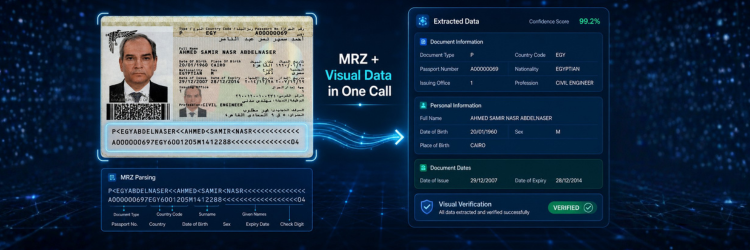
Travel platforms, hotel check-in systems, and border processing applications all need structured identity data from Egyptian passports — fast, accurately, and without exposing staff to manual data entry errors. SignMe extracts the full MRZ and visual zone in a single API call, returning typed JSON with named fields ready for your database in under 400ms.
What Is Passport OCR?
Passport OCR is the automated extraction of identity fields from a scanned or photographed passport data page. For Egyptian passports — which follow the ICAO TD3 international standard — this means capturing two distinct data sources on the same page: the Machine Readable Zone (MRZ) at the bottom, and the Visual Inspection Zone (VIZ) printed above it.
A complete passport OCR solution must read both zones and reconcile them into
a single coherent response. APIs that only parse the MRZ miss the Arabic name,
place of birth, and issuing authority data that many Egyptian compliance workflows
require. APIs that only read the visual zone cannot provide the structured,
check-digit-validated data that border and aviation systems depend on.
SignMe does both in one call with ID_type=2.
MRZ vs Visual Zone OCR: What's the Difference?
Machine Readable Zone (MRZ)
The MRZ is the two-line block of characters at the bottom of the passport data page, printed in OCR-B typeface — a font specifically designed for optical character recognition. Each line is exactly 44 characters wide (TD3 format). The structure is standardised by ICAO Doc 9303 and does not vary between issuing countries.
Line 1 encodes document type, issuing country, and the holder's name in Latin characters. Line 2 encodes passport number, nationality, date of birth, sex, expiry date, and a personal number field — which on Egyptian passports contains the holder's 14-digit national ID number. Each variable-length field is followed by a check digit that allows any reading system to validate extraction integrity.
MRZ parsing is technically simpler than visual zone OCR — the font is fixed, the positions are specified to the character, and check digits provide immediate error detection. The limitation is scope: the MRZ contains no Arabic text, no place of birth, no issuing authority, and no issue date.
Visual Inspection Zone (VIZ)
The VIZ is the human-readable printed area above the MRZ — the part a border officer reads with their eyes. It contains everything the MRZ does not: the Arabic name, place of birth, date of issue, and issuing authority. It also prints the same fields as the MRZ (name, DOB, expiry) in a more legible layout.
VIZ extraction is the harder problem. Unlike the MRZ, the VIZ has no fixed character positions, uses mixed languages (Arabic and Latin on the same page), and is sensitive to print quality, scan resolution, and document age. A model that cannot handle RTL Arabic natively will return either empty Arabic fields or garbled text — not acceptable for KYC workflows in Egypt where the Arabic name is the authoritative legal identifier.
How SignMe handles both
SignMe extracts MRZ and VIZ in a single call and uses the MRZ check-digit validation to cross-verify the visual zone output. Where the MRZ and VIZ return conflicting values for the same field (e.g., a transposed digit in a date), the API flags the discrepancy in the confidence score rather than silently returning one value and discarding the other. The raw MRZ strings are also returned in the response for systems that need them alongside the parsed fields.
Challenges With Egyptian Passport OCR
Bilingual data page with RTL Arabic
The Egyptian passport data page prints the holder's name in Arabic above the Latin transliteration. For most downstream systems — banks, hotels, government portals — the Arabic name is the field that must match internal records, since Egyptian bureaucratic databases are indexed by Arabic name, not Latin transliteration. Generic OCR engines that process the page left-to-right return the Latin fields cleanly and produce garbled or empty output for the Arabic section.
Embedded national ID in MRZ personal number field
Egyptian passports encode the holder's national ID number in the MRZ personal
number field (positions 28–42, line 2). This is not universally understood by
off-the-shelf MRZ parsers, which treat this field as an opaque optional string.
For workflows that need to cross-reference passport identity against the national
ID system — banks, fintechs, KYC platforms — this field is critical. SignMe
extracts and exposes it as a named national_id field.
Document age and laminate degradation
Egyptian passports are valid for seven years. A passport scanned at renewal or at a hotel check-in after years of travel shows wear: faded ink, scratched laminate, and compression artefacts from being folded in luggage. The MRZ is particularly vulnerable — its thin OCR-B characters degrade quickly on worn laminate. A production API must maintain accuracy on these real-world documents, not just clean press-quality scans.
How SignMe API Solves This
SignMe is purpose-trained on Egyptian passport data pages. Key capabilities:
- Full MRZ parsing with check-digit validation — both MRZ lines parsed to named fields, check digits verified, discrepancies flagged in the confidence score.
- Native Arabic VIZ extraction — Arabic name and place of birth returned as separate fields, not omitted or transliterated.
- National ID field extracted — MRZ personal number decoded and returned as
national_idfor cross-document verification. - Raw MRZ strings included — for downstream systems that consume the raw MRZ alongside parsed fields.
- ISO 8601 dates throughout — DOB, issue date, and expiry date all returned as
YYYY-MM-DD; no date parsing in your application. - Confidence score per response — programmatically route low-confidence scans to manual review.
- Under 400ms average — synchronous flows at check-in counters and border lanes are fully supported.
- Failed calls not charged — credits are consumed only on successful extraction.
Passport support was introduced in SignMe API v1.4 alongside resident permit cards. See pricing for current credit bundles.
Example API Response
A representative response for an Egyptian passport scan
(ID_type=2):
{
  "status": "success",
  "data": {
    "passport_number":  "A12345678",
    "full_name":        "أحمد محمد عبد الله",
    "full_name_en":     "Ahmed Mohamed Abdullah",
    "nationality":      "Egyptian",
    "nationality_code": "EGY",
    "sex":              "M",
    "birth_date":       "1985-06-15",
    "issue_date":       "2020-03-10",
    "expiry_date":      "2027-03-09",
    "place_of_birth":   "Cairo",
    "issuing_authority": "Ministry of Interior",
    "national_id":      "28506151234567",
    "mrz_line1":        "P<EGYABDULLAH<<AHMED<MOHAMED<<<<<<<<<<<<<<<",
    "mrz_line2":        "A123456784EGY8506150M2703099<<<<<<<<<<<<<<06"
  },
  "confidence":         0.98,
  "credits_used":       1,
  "response_time_ms":   334
}
mrz_line1 and mrz_line2 are the raw 44-character
strings alongside all parsed named fields. national_id is
decoded from the MRZ personal number field — the 14-digit Egyptian national
ID embedded in every Egyptian passport. All dates are ISO 8601.
Failed API calls are not billed.
How to Integrate in 3 Steps
- 1Get your API keyCreate a free account. The free tier includes 100 API calls — enough to build, test, and validate a complete passport scanning integration. No credit card required.
- 2POST the passport imageSend a
multipart/form-dataPOST with your API key in theAuthorizationheader andID_type=2to identify the document as a passport or resident permit. - 3Consume the structured responseRead named fields directly. The response includes both parsed fields and raw MRZ strings — your application decides which representation to store. No regex, no MRZ character-position arithmetic, no date parsing.
curl -X POST \
  "https://webapi.signme.it/api/v2/SignMeAPI/uploadImage?ID_type=2" \
  -H "Authorization: Bearer YOUR_API_KEY" \
  -H "Content-Type: multipart/form-data" \
-F "file=@/path/to/passport-data-page.jpg"const form = new FormData();
form.append("file", fileInput.files[0]);
const res = await fetch(
"https://webapi.signme.it/api/v2/SignMeAPI/uploadImage?ID_type=2",
{
method: "POST",
headers: { "Authorization": "Bearer YOUR_API_KEY" },
body: form,
}
);
const { data } = await res.json();
console.log(data.passport_number); // "A12345678"
console.log(data.full_name); // "أحمد محمد عبد الله"
console.log(data.full_name_en); // "Ahmed Mohamed Abdullah"
console.log(data.national_id); // "28506151234567"
console.log(data.expiry_date); // "2027-03-09"
// Validity check
const isValid = new Date(data.expiry_date) > new Date();using var form = new MultipartFormDataContent();
using var file = File.OpenRead("passport-data-page.jpg");
form.Add(new StreamContent(file), "file", "passport-data-page.jpg");
using var http = new HttpClient();
http.DefaultRequestHeaders.Authorization =
new AuthenticationHeaderValue("Bearer", "YOUR_API_KEY");
var response = await http.PostAsync(
"https://webapi.signme.it/api/v2/SignMeAPI/uploadImage?ID_type=2",
form
);
var json = await response.Content.ReadAsStringAsync();
// Deserialise to your model and access:
// result.Data.PassportNumber
// result.Data.FullName // Arabic
// result.Data.FullNameEn
// result.Data.NationalId
// result.Data.ExpiryDateFull code examples for Python, Dart, and PHP are in the API documentation.
Use Cases
Travel Platforms and Online Check-In
Travel booking platforms and airlines require Egyptian passport data for passenger name records, visa verification, and customs pre-declaration. Asking travellers to type their passport details manually generates transcription errors that surface as mismatches at the gate or border. With SignMe, the traveller photographs their passport data page at booking time, the API returns all fields in under 400ms, and the platform populates the PNR automatically — with the Arabic name stored alongside the Latin transliteration for Egyptian regulatory compliance.
Hotel and Hospitality Check-In
Egyptian law requires hotels to record guest identity document data at check-in. Manual transcription from passports is slow, error-prone, and creates a queue at the reception desk. SignMe lets front-desk staff scan the passport data page in under two seconds — the system logs the passport number, full name in Arabic and English, nationality, and DOB directly into the property management system with no typing. For hospitality chains managing compliance across multiple properties, the API supports concurrent requests without a per-property integration overhead.
KYC and Financial Onboarding
Banks and fintechs onboarding Egyptian customers who present a passport
rather than a National ID need to extract the embedded national ID number for
AML database lookups and credit bureau queries. SignMe returns the
national_id field directly from the MRZ — the same 14-digit
identifier used by all Egyptian government systems — enabling a complete
cross-document identity check in a single API call. See
all use cases for KYC workflow details.
Border Processing and Government Systems
Government agencies processing Egyptian passports at land borders, ports, and airports need MRZ-grade extraction with check-digit validation — not approximate visual OCR. SignMe validates all MRZ check digits before returning a result and flags any validation failure in the confidence score, giving processing systems a programmatic signal to route suspicious documents to secondary inspection. For sovereign deployments, SignMe supports on-premise installation with no external data transmission. Contact the enterprise team for details.
Accuracy and Performance
| Metric | Value |
|---|---|
| MRZ field extraction accuracy | 99%+ |
| Visual zone (VIZ) accuracy | 99%+ |
| Average response time | < 400ms |
| Uptime SLA | 99.9% |
| Supported formats | JPEG · PNG · PDF |
| MRZ check-digit validation | Yes — all fields |
| Arabic VIZ extraction | Yes — separate field |
| National ID from MRZ | Yes — dedicated field |
| Failed-call billing | Not charged |

Frequently Asked Questions
Passport number, full name in Arabic and English, nationality, date of birth, sex, date of issue, expiry date, place of birth, issuing authority, the embedded national ID number from the MRZ personal number field, and both raw MRZ line strings.
Yes. Both TD3 MRZ lines are parsed to named fields, all check digits are validated, and the raw strings are returned alongside the parsed output. Discrepancies between MRZ and visual zone data are reflected in the confidence score.
Yes. Egyptian passports encode the holder's 14-digit national ID
in the MRZ personal number field. SignMe extracts and returns it
as a dedicated national_id field — the same identifier
used by banks, government portals, and credit bureaux.
MRZ OCR reads the two fixed-format lines at the bottom of the data page — structured, check-digit-validated, Latin-only. Visual zone OCR reads the human-readable fields above the MRZ, including Arabic name, place of birth, and issuing authority not present in the MRZ. SignMe performs both in a single call.
99%+ accuracy on undamaged data pages under standard scanning conditions. SignMe cross-validates the Arabic visual zone name against the Latin MRZ transliteration, providing a built-in consistency check that generic OCR engines do not perform.
Yes. For border agencies, airlines, and platforms with data sovereignty requirements, SignMe supports on-premise deployment. Passport data never leaves your infrastructure. Contact the enterprise team for deployment architecture and SLA options.
Start Building
Scan Egyptian passports in minutes
Free tier includes 100 API calls — enough to build, test, and validate a
complete passport integration.
No credit card required. Live in under five minutes.
Already have an account? Sign in →