The SignMe Egyptian ID OCR API returns Arabic text exactly as printed on the document — UTF-8 encoded, byte-perfect. Displaying it is a different problem. RTL direction, bidirectional Unicode, font selection, and framework-specific quirks trip up even experienced developers. This guide fixes all of it, with copy-paste code for web, mobile, and backend.
Arabic text from an OCR API is valid UTF-8 — rendering problems are always caused by the UI, not the API. Fix them with five rules:
- Add dir="rtl" and lang="ar" to every element containing Arabic text
- Set unicode-bidi: embed in CSS to prevent a parent LTR container from overriding direction
- Load an Arabic font: Cairo, Tajawal, or Amiri via Google Fonts
- For mixed Arabic/English content, wrap each part in its own element with the correct direction
- Never sort Arabic strings by byte order — use locale-aware collation (
localeCompare('ar')in JS,CultureInfo("ar")in .NET)
Why Arabic Text Needs Special Handling
Arabic is a right-to-left script. When a browser, mobile renderer, or PDF engine encounters Arabic characters without explicit direction instructions, it falls back to its own heuristics — which frequently produce wrong results, especially in mixed content (an Arabic name next to a national ID number, for example).
Three distinct problems cause garbled Arabic output, and they compound each other:
dir="rtl", Arabic words appear in the correct Unicode code-point
order, but the line flows left-to-right — so the sentence reads backwards.
All three have clear, well-supported fixes. The sections below give you the exact code for each platform.
Web: HTML and CSS
The minimum correct markup for any Arabic string received from the API is:
<!-- Minimum: direction + language on the element -->
<span lang="ar" dir="rtl">محمد أحمد السيد</span>

<!-- Mixed content: isolate each part in its own element -->
<div class="identity-row">
  <span lang="ar" dir="rtl" class="arabic-name">محمد أحمد السيد</span>
  <span class="id-number">29901011234567</span>
</div>
Pair the markup with a single reusable CSS class:
/* Load from Google Fonts — add to your <head> */
@import url('https://fonts.googleapis.com/css2?family=Cairo:wght@400;600;700&display=swap');

.arabic-text {
  font-family: 'Cairo', 'Tajawal', 'Amiri', Arabic, sans-serif;
  direction: rtl;
  text-align: right;
  unicode-bidi: embed;   /* prevents parent LTR context from overriding */
}

/* Use isolate when Arabic and LTR content share the same line */
.arabic-isolated {
  unicode-bidi: isolate;
}
Font priority: use Cairo for modern product UIs
(it's what this site uses), Tajawal for compact tables and
dashboards, and Amiri for formal or legal documents. Always
include Arabic, sans-serif as a system fallback in case the web
font fails to load.
Page-Level vs Element-Level Direction
If your entire UI is Arabic-first (an HR portal, a government app), set direction on the root element and override LTR for numeric fields. For mixed apps (English UI, Arabic data values), set direction per-element only.
<!-- Arabic-first app: set RTL at root -->
<html lang="ar" dir="rtl">
  <!-- override specific elements back to LTR -->
  <span dir="ltr" class="id-number">29901011234567</span>
</html>

<!-- Mixed app: set RTL only on the data cell -->
<td>
  <span lang="ar" dir="rtl" class="arabic-text">
    @customer.FullName   <!-- Blazor -->
    {customer.fullName}   {/* React / Vue */}
  </span>
</td>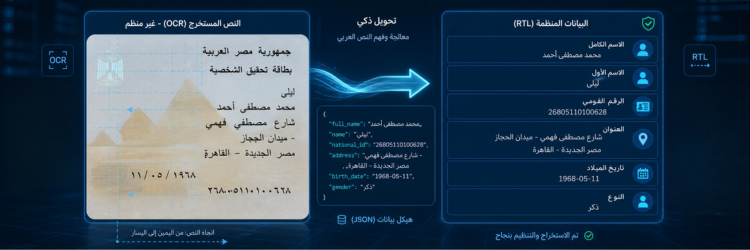
JavaScript and Frontend Frameworks
When rendering API data dynamically, detect whether a field contains Arabic before
applying direction. The SignMe API returns both full_name (Arabic)
and full_name_en (transliterated English) — your UI may need to
handle both.
// Detect Arabic script — Unicode block U+0600–U+06FF
function isArabic(str) {
return /[-ۿ]/.test(str);
}
// Apply direction to any DOM element
function renderLocalizedText(el, text) {
el.textContent = text;
el.dir = isArabic(text) ? 'rtl' : 'ltr';
el.lang = isArabic(text) ? 'ar' : 'en';
el.classList.toggle('arabic-text', isArabic(text));
}
// Usage with a SignMe API response
fetch('https://api.signme.it/ocr', {
method: 'POST',
body: formData,
headers: { 'x-api-key': apiKey }
})
.then(r => r.json())
.then(({ data }) => {
renderLocalizedText(document.getElementById('customer-name'), data.full_name);
renderLocalizedText(document.getElementById('customer-address'), data.address);
});React
// ArabicText.jsx — reusable component for any Arabic OCR field
function ArabicText({ text, className = '' }) {
const arabic = /[-ۿ]/.test(text ?? '');
return (
<span
lang={arabic ? 'ar' : 'en'}
dir={arabic ? 'rtl' : 'ltr'}
className={`${arabic ? 'arabic-text' : ''} ${className}`.trim()}
>
{text}
</span>
);
}
// Usage in a KYC review card
function CustomerCard({ data }) {
return (
<div className="kyc-card">
<ArabicText text={data.full_name} />
<ArabicText text={data.address} />
<span className="id-number">{data.national_id}</span>
</div>
);
}Vue 3
<!-- ArabicText.vue -->
<template>
<span
:lang="isArabic ? 'ar' : 'en'"
:dir="isArabic ? 'rtl' : 'ltr'"
:class="{ 'arabic-text': isArabic }"
>{{ text }}</span>
</template>
<script setup>
import { computed } from 'vue';
const props = defineProps({ text: String });
const isArabic = computed(() => /[-ۿ]/.test(props.text ?? ''));
</script>Mobile Apps
React Native
React Native respects writingDirection in the Text
style prop. Set it explicitly — do not rely on automatic detection, which varies
by platform version.
import { Text, StyleSheet } from 'react-native';

const styles = StyleSheet.create({
  arabicName: {
    writingDirection: 'rtl',
    textAlign: 'right',
    fontFamily: 'Cairo-Regular',  // must be bundled in assets/fonts/
    fontSize: 16,
    color: '#1E293B',
  },
});

function ArabicName({ name }) {
  return <Text style={styles.arabicName}>{name}</Text>;
}
Flutter
// pubspec.yaml: add Cairo.ttf under flutter > fonts > assets
Text(
  customerName,
  textDirection: TextDirection.rtl,
  textAlign: TextAlign.right,
  style: const TextStyle(
    fontFamily: 'Cairo',
    fontSize: 16,
  ),
)
iOS (Swift)
UIKit reads RTL from semanticContentAttribute. SwiftUI uses
.environment(\.layoutDirection, .rightToLeft) on the containing view.
let label = UILabel()
label.text                    = customer.fullName   // Arabic string from SignMe API
label.semanticContentAttribute = .forceRightToLeft
label.textAlignment            = .right
label.font                     = UIFont(name: "Cairo-Regular", size: 16)
                                  ?? .systemFont(ofSize: 16)
Backend: Storage, Search, and Sorting
Arabic text from the API can be stored as-is in any UTF-8 column — no transliteration, normalization, or special encoding is needed. Issues arise at search and sort time.
| Database | Storage | Sorting / Collation | Search |
|---|---|---|---|
| PostgreSQL | UTF-8 text column | lc_collate = 'ar_EG.UTF-8' |
pg_trgm or Arabic full-text dictionary |
| MySQL / MariaDB | UTF-8 text column | utf8mb4_unicode_ci — never utf8mb4_bin |
Full-text index with WITH PARSER ngram |
| MongoDB | BSON string (UTF-8) | Collation: locale: 'ar', strength: 2 |
Text index with language "none" (Arabic stemmer limited) |
| Elasticsearch | text field | ICU analysis plugin | Built-in arabic analyzer — stemming, diacritics, ligatures |
.NET / C#
System.Text.Json and Newtonsoft.Json both decode
UTF-8 Arabic strings correctly out of the box. The only backend concern is
sorting and comparison — always pass an Arabic CultureInfo.
using System.Globalization;

// Deserialisation — no special handling needed, UTF-8 is the default
var response = JsonSerializer.Deserialize<SignMeResponse>(json);
string arabicName = response!.Data.FullName;   // "محمد أحمد السيد"

// Locale-aware sort
var sortedCustomers = customers
    .OrderBy(c => c.FullName,
             StringComparer.Create(new CultureInfo("ar"), ignoreCase: true))
    .ToList();

// Locale-aware substring search
var ci = new CultureInfo("ar");
bool found = ci.CompareInfo.IndexOf(arabicName, searchTerm,
                                    CompareOptions.IgnoreCase) >= 0;
Python
import json

# json.loads handles UTF-8 Arabic natively — no extra decoding needed
response   = json.loads(api_response_text)
arabic_name = response["data"]["full_name"]   # correct Arabic string

# Locale-aware sort — requires PyICU: pip install PyICU
import icu
collator = icu.Collator.createInstance(icu.Locale('ar'))
names.sort(key=collator.getSortKey)

# Simple contains (Arabic has no case, so plain 'in' works for exact substring)
if search_term in arabic_name:
    print("Match found")
PDF Generation
Most PDF libraries need Arabic support configured explicitly — it is not automatic. Requirements: an embedded Arabic font, a Bidi algorithm (letters must be reordered for visual display), and Arabic letter shaping (isolated / initial / medial / final glyph forms).
| Library | Language | Arabic Support | Notes |
|---|---|---|---|
| iText 7 | .NET / Java | ✅ Built-in | Set font to an Arabic TTF; use TextAlignment.RIGHT and BaseDirection.RIGHT_TO_LEFT |
| QuestPDF | .NET | ⚠️ Partial | Embed Cairo or Noto Naskh Arabic; RTL layout requires explicit column ordering |
| ReportLab | Python | ✅ Via plugins | Run through arabic-reshaper + python-bidi first — see code below |
| PDFKit / wkhtmltopdf | Node.js | ✅ Via HTML | Render HTML with dir="rtl" and Arabic font; PDF inherits correctly |
| jsPDF | JavaScript | ⚠️ Plugin | Requires jspdf-arabic plugin and an embedded Arabic font file |
For Python PDF generation, always reshape and apply the Bidi algorithm before passing Arabic text to the rendering call:
# pip install arabic-reshaper python-bidi
import arabic_reshaper
from bidi.algorithm import get_display

arabic_name = response["data"]["full_name"]

# Step 1: reshape letter forms (connects initial / medial / final glyphs)
reshaped = arabic_reshaper.reshape(arabic_name)

# Step 2: apply Unicode Bidi algorithm (reorders for visual left-to-right rendering)
display_name = get_display(reshaped)

# Now safe to pass to ReportLab, FPDF, or any pixel-based renderer
pdf.drawString(x, y, display_name)
Common Mistakes
- 1Blaming the API for garbled outputThe SignMe API always returns valid UTF-8. If Arabic looks wrong, the problem is in your UI — check
dir,lang, font availability, andunicode-bidibefore assuming the response is corrupt. - 2Setting dir="rtl" on a parent instead of the text elementRTL on a container without
unicode-bidi: embedon the child causes mixed-content reordering. Always setdirandlangdirectly on the element that wraps the Arabic string. - 3Mixing an Arabic name and a national ID in one elementDisplaying
محمد أحمد السيد — 29901011234567in a single un-isolated element causes the number to jump to the wrong end of the name. Wrap each segment in its own<span>with an explicit direction. - 4Sorting Arabic strings by byte orderArabic Unicode code points do not produce a meaningful alphabetical order when sorted numerically. Use
localeCompare('ar')in JavaScript,StringComparer.Create(new CultureInfo("ar"), ...)in .NET, or PyICU'sCollatorin Python. - 5Not embedding Arabic fonts in PDFsPDFs that depend on system fonts display boxes or question marks on any machine without Arabic fonts installed. Always embed Cairo, Noto Naskh Arabic, or Amiri directly in the PDF file itself.
- 6Skipping Arabic reshaping in Python PDF generationWithout
arabic-reshaperandpython-bidi, ReportLab renders each Arabic letter in its isolated form — technically the right characters, but visually broken because they do not connect. Always reshape before passing to a PDF renderer.
Use Cases
Every application built on the Egyptian National ID OCR API handles Arabic output. Rendering requirements differ by context:
- KYC / digital onboarding: Show Arabic name and transliterated English name side-by-side in a verification card. Wrap each in its own element with the correct direction. The national ID number and expiry date stay LTR.
- Hotel / hospitality check-in: Display Arabic name on a welcome
screen or key card. A single container with
dir="rtl"is sufficient for display-only contexts with no mixed content. - Government portals: Arabic-first UIs where the entire page is
RTL. Set
<html dir="rtl" lang="ar">at root and add LTR overrides for numeric fields, dates, and English labels. - PDF contracts and invoices: Embed an Arabic font, run reshaper and Bidi, then render. Test on a clean machine (no Arabic system fonts) to confirm the embedded font is actually used.
- Database-backed search: Use the correct Arabic collation for
your engine. Index the Arabic name column separately from the
full_name_encolumn — they serve different search audiences.
Frequently Asked Questions
dir="rtl" and lang="ar" to the element
that wraps the Arabic string. If it still looks wrong, confirm that an
Arabic-supporting font (Cairo, Tajawal, or Amiri) is loaded and applied.
full_name, address,
governorate, religion, marital_status —
are returned as UTF-8 encoded JSON strings. Standard parsers in every language
handle this natively. No additional decoding step is needed.
/[-ۿ]/.test(str). If
true, set dir="rtl" and lang="ar" on
the element. This is useful when a field might contain either Arabic or
transliterated Latin text depending on the document scanned.
pg_trgm; MySQL — use utf8mb4_unicode_ci
collation; Elasticsearch — use the built-in arabic analyzer.
Never sort or filter Arabic with byte-order or Ordinal comparers —
they produce wrong alphabetical ordering.
arabic-reshaper
then python-bidi before passing it to ReportLab or FPDF. In .NET,
iText 7 handles shaping internally when configured with an embedded Arabic font.
Always embed the font — never rely on system fonts.
Get a free API key and scan your first Egyptian ID — fully structured Arabic and English output — in under five minutes.
Free tier includes 100 scans/month · No credit card required · See full pricing