This is the reference you keep open while building. Every field returned by the SignMe Egyptian National ID OCR API is documented here — with the data type, source (ID number digits vs. visual zone), a real example value, and the edge cases that trip up most integrations.
An Egyptian National ID card returns 11 fields from the SignMe OCR API:
- national_id — the 14-digit ID number (string)
- full_name — holder's name in Arabic
- full_name_en — Latin transliteration of the name
- birth_date — ISO 8601 date (YYYY-MM-DD)
- gender — "Male" or "Female"
- governorate — residential governorate (Arabic name)
- address — full address in Arabic
- issue_date — ISO 8601 date
- expiry_date — ISO 8601 date
- religion — Arabic string (may be absent on newer cards)
- marital_status — Arabic string (may be absent on newer cards)
Five of these fields (birth_date, gender,
and the registration governorate) can be derived from the
14-digit ID number alone. The remaining fields come from the card's
printed visual zone.
The 14-Digit National ID Number Structure
The Egyptian national ID number (الرقم القومي) is exactly 14 digits. It is not a random sequence — it encodes the holder's century of birth, full date of birth, the governorate where the ID was registered, a unique serial number that also encodes gender, and a check digit. Understanding this structure lets you validate ID numbers and cross-check API field values without a second API call.
| Position(s) | Length | Example | Meaning |
|---|---|---|---|
1 |
1 digit | 2 |
Century — 2 = born 1900–1999 · 3 = born 2000–2099 |
2–3 |
2 digits | 99 |
Year of birth (YY) — combine with century for full year |
4–5 |
2 digits | 01 |
Month of birth (MM) |
6–7 |
2 digits | 01 |
Day of birth (DD) |
8–9 |
2 digits | 12 |
Governorate registration code (see table below) — not necessarily the residential governorate |
10–13 |
4 digits | 3456 |
Serial number — odd = Male · even = Female |
14 |
1 digit | 7 |
Check digit — used to validate the full number |
Worked example — ID number 29901011234567:
- Digit
2→ century = 1900s - Digits
99→ year = 1999 (1900 + 99) - Digits
01→ month = January - Digits
01→ day = 1st - Digits
12→ registered in Dakahlia governorate - Digits
3456→ serial 3456 is even → Female - Digit
7→ check digit
The SignMe API extracts all of this automatically. You receive structured fields directly — no need to parse the 14-digit string in your application.
All API Fields at a Glance
The following table covers every field returned in the data object.
"Source" indicates whether the value comes from the ID number digits
or from the card's printed visual zone.
| Field | Type | Example Value | Source |
|---|---|---|---|
national_id |
string | "29901011234567" |
Visual zone (OCR of printed number) |
full_name |
string (Arabic) | "محمد أحمد السيد" |
Visual zone — right-to-left |
full_name_en |
string (Latin) | "Mohamed Ahmed El-Sayed" |
Visual zone — Latin transliteration |
birth_date |
string (ISO 8601) | "1999-01-01" |
Derived from ID number digits 1–7 |
gender |
string | "Male" · "Female" |
Derived from ID number digits 10–13 |
governorate |
string | "Cairo" |
Visual zone — residential address governorate |
address |
string (Arabic) | "12 شارع النيل، المنصورة" |
Visual zone — right-to-left |
issue_date |
string (ISO 8601) | "2020-05-14" |
Visual zone |
expiry_date |
string (ISO 8601) | "2030-05-14" |
Visual zone |
religion |
string (Arabic) · nullable | "مسلم" · "مسيحي" |
Visual zone — absent on newer card generations |
marital_status |
string (Arabic) · nullable | "أعزب" · "متزوج" |
Visual zone — absent on newer card generations |
Governorate Registration Codes — Complete Reference
Digits 8–9 of the national ID number contain a two-digit governorate code.
This is the governorate where the ID was registered — it does not
necessarily match where the holder currently lives. The residential governorate
is a separate field (governorate) extracted from the visual zone.
The SignMe API resolves the code to an English name automatically and returns
it alongside the visual-zone governorate field.
The table below is the complete reference for manual validation or display mapping.
| Code | English Name | Arabic Name |
|---|---|---|
| 01 | Cairo | القاهرة |
| 02 | Alexandria | الإسكندرية |
| 03 | Port Said | بور سعيد |
| 04 | Suez | السويس |
| 11 | Damietta | دمياط |
| 12 | Dakahlia | الدقهلية |
| 13 | Sharqia | الشرقية |
| 14 | Qalyubia | القليوبية |
| 15 | Kafr El Sheikh | كفر الشيخ |
| 16 | Gharbia | الغربية |
| 17 | Menoufia | المنوفية |
| 18 | Beheira | البحيرة |
| 19 | Ismailia | الإسماعيلية |
| 21 | Giza | الجيزة |
| 22 | Beni Suef | بني سويف |
| 23 | Fayoum | الفيوم |
| 24 | Minya | المنيا |
| 25 | Assiut | أسيوط |
| 26 | Sohag | سوهاج |
| 27 | Qena | قنا |
| 28 | Aswan | أسوان |
| 29 | Luxor | الأقصر |
| 31 | Red Sea | البحر الأحمر |
| 32 | New Valley | الوادي الجديد |
| 33 | Matrouh | مطروح |
| 34 | North Sinai | شمال سيناء |
| 35 | South Sinai | جنوب سيناء |
| 88 | Foreign-born | خارج الجمهورية |
Codes 05–10 and 20 are not assigned. Codes jump from 04 (Suez) to 11 (Damietta) and from 19 (Ismailia) to 21 (Giza) — these gaps are by design in the original numbering scheme. Do not treat a missing code as an invalid ID.
Date Fields and ISO 8601 Format
All three date fields — birth_date, issue_date, and
expiry_date — are returned as ISO 8601 strings in
YYYY-MM-DD format. No parsing, no locale handling, no ambiguous
month/day ordering. They are directly comparable with standard date libraries
in every language.
Birth date — derived from the ID number
birth_date is reconstructed from digits 1–7 of the national ID
number. Digit 1 determines the century prefix: 2 → 19,
3 → 20. Digits 2–3 provide the two-digit year; digits
4–5 the month; digits 6–7 the day.
Because birth_date is derived from the ID number, not the printed
date on the card, it is more reliable than OCR of the date field alone — the ID
number is machine-printed in a fixed format and does not degrade the way
hand-stamped dates can.
Issue and expiry dates — from the visual zone
issue_date and expiry_date are extracted from the
printed fields on the card. Egyptian National IDs are typically valid for
7 years from issue date for adults, or until age 16/21 for minors issued
provisional cards. Use expiry_date directly for validity checks:
const isExpired = new Date(data.expiry_date) < new Date();

// C#
var isExpired = DateOnly.Parse(data.ExpiryDate) < DateOnly.FromDateTime(DateTime.Today);

// Python
from datetime import date, datetime
is_expired = datetime.fromisoformat(data["expiry_date"]).date() < date.today()
Gender — Derived from the Serial Number
Gender is not printed as a standalone field on the Egyptian National ID card. It is derived programmatically from digits 10–13 (the 4-digit serial number):
- If the 4-digit serial is odd → Male (
"Male") - If the 4-digit serial is even → Female (
"Female")
In practice, only the final digit of the serial matters (odd/even is determined
by the last digit). The SignMe API resolves this and returns the human-readable
"Male" or "Female" string — no digit inspection needed
in your application.
Important: Do not confuse the serial number gender derivation with digit 14 (the check digit). Digit 14 has no gender meaning — it is purely a validation digit calculated from the preceding 13 digits.
Arabic Name and Address Fields — RTL Rendering
Three fields return Arabic text: full_name, address,
and conditionally religion and marital_status.
Arabic is a right-to-left script. Rendering it without proper RTL handling
produces visually correct Unicode but reversed visual word order — a common
bug that looks fine in a database but breaks in any UI.
HTML rendering
<!-- Apply RTL and lang to the element wrapping the Arabic field -->
<span lang="ar" dir="rtl">محمد أحمد السيد</span>

<!-- For address blocks, also set text-align: right -->
<p lang="ar" dir="rtl" style="text-align: right;">
  12 شارع النيل، المنصورة
</p>.arabic-field {
font-family: 'Cairo', 'Tajawal', 'Amiri', sans-serif;
direction: rtl;
text-align: right;
unicode-bidi: embed;
}
/* Blazor / Razor example */
<span class="arabic-field"> @data.FullName</span>Recommended Arabic fonts available via Google Fonts: Cairo (modern, clean — used on this site), Tajawal (condensed, good for tables), Amiri (traditional, serif — appropriate for legal documents). All three reliably support the Arabic characters that appear in Egyptian government documents.
If you are building a mobile app, ensure the device's Arabic system font is loaded before rendering — do not assume Cairo is available natively. For PDF generation (invoices, contracts), embed the font explicitly.
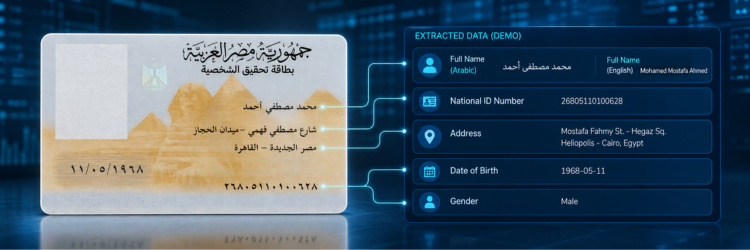
Example API Response — Annotated
A complete data object from a successful National ID scan,
with all fields present. religion and marital_status
will be null on ID cards issued after approximately 2021.
{
  "status": "success",
  "data": {
    "national_id":    "29901011234567",
    "full_name":      "محمد أحمد السيد",
    "full_name_en":   "Mohamed Ahmed El-Sayed",
    "birth_date":     "1999-01-01",
    "gender":         "Male",
    "governorate":    "Dakahlia",
    "address":        "12 شارع النيل، المنصورة، الدقهلية",
    "issue_date":     "2020-05-14",
    "expiry_date":    "2030-05-14",
    "religion":       "مسلم",
    "marital_status": "أعزب"
  },
  "confidence":       0.97,
  "credits_used":     1,
  "response_time_ms": 278
}
Field notes:
national_id is a string — never cast to int or
long without checking type limits first.
birth_date matches digits 1–7 of national_id.
gender is derived from digits 10–13.
governorate is the residential governorate from the card's
printed address — it may differ from the registration governorate encoded
in digits 8–9 of the ID number.
See the full API reference for HTTP status codes and
error object schema.
Common Field Handling Mistakes
1. Storing national_id as an integer
A 14-digit number exceeds the maximum value of a 32-bit integer
(2,147,483,647 ≈ 10 digits). Casting national_id to
int in C#, Java, or a database INT column silently truncates
or overflows the value. Always store as VARCHAR(14) in SQL,
string in application code, or BIGINT if
numeric storage is required.
2. Confusing registration governorate with residential governorate
Digits 8–9 of the ID number encode the governorate where the ID was
registered. The governorate API field is the holder's
current address governorate from the visual zone. These frequently
differ — a person born and registered in Assiut who now lives in Cairo will
have code 25 in the ID number but "Cairo" in the
governorate field. Do not use the two interchangeably.
3. Not applying RTL direction to Arabic fields
Arabic Unicode characters have inherent directionality, so the stored bytes
are always correct. The bug occurs at render time: without dir="rtl",
surrounding LTR context forces Arabic characters to render right-to-left in the
wrong visual position — names appear reversed or broken at punctuation boundaries.
Always wrap Arabic field output with lang="ar" dir="rtl".
4. Expecting religion and marital_status to always be present
Egypt began phasing out the religion field from National ID cards in 2021.
Cards issued after this transition will return null for
religion and marital_status. Treat both as
nullable — do not use them as required fields in any validation or
data-completeness check.
5. Parsing birth_date from the ID number manually
A common pattern is substring-parsing the national_id field
to reconstruct birth date and gender. This is unnecessary — the API returns
birth_date and gender as dedicated, typed fields.
Manual parsing adds code complexity and creates a divergence risk if the
ID number field contains a leading/trailing space or is read differently
across locales.
6. Hardcoding date comparisons without timezone awareness
All date fields are in YYYY-MM-DD format with no time or
timezone component. Use DateOnly in .NET,
date.today() in Python, or parse with
new Date(value + "T00:00:00") in JavaScript to avoid UTC
offset ambiguity when comparing against "today."
Use Cases Built on Field Data
Age verification from birth_date
Financial platforms, alcohol and tobacco merchants, and gaming apps use
birth_date to calculate age at the point of onboarding.
Because the date is ISO 8601, the comparison is a single subtraction.
Unlike manual entry, the date cannot be mistyped — it is derived from the
ID number itself. See all KYC and verification use cases.
Pre-populating forms with name and address
Banks, insurance applications, and government portals use full_name_en
and address to pre-fill onboarding forms. Drop-off rates fall
significantly when users do not need to type their full name and address.
Store both Arabic (full_name) and Latin (full_name_en)
versions — Arabic is required for matching against government databases,
Latin for international systems.
Governorate-based routing and segmentation
Logistics platforms, regional service providers, and analytics pipelines use
the governorate field to route customers to the correct regional
branch, apply governorate-specific pricing, or segment analytics by geography.
The field returns an English string — map it to your internal region codes
using the governorate table above.
ID number validation before scanning
If a user types their national ID number into a form before uploading a scan, you can validate the format client-side using the structure rules: 14 digits, first digit 2 or 3, digits 8–9 between 01–35 or 88. This catches obvious typos before an API credit is consumed. See the API documentation for full error codes.

Frequently Asked Questions
11 fields: national_id, full_name (Arabic),
full_name_en, birth_date, gender,
governorate, address, issue_date,
expiry_date, religion, and
marital_status. The last two may be null
on cards issued after 2021.
Digit 1 = century (2=1900s, 3=2000s). Digits 2–7 = birth date (YYMMDD). Digits 8–9 = governorate registration code. Digits 10–13 = serial number (odd=male, even=female). Digit 14 = check digit.
Digits 8–9 of the ID number reflect the governorate where the ID was
originally registered — it does not change if the holder moves.
The governorate API field is from the card's printed address
(visual zone) and reflects current residence. The two can differ.
Yes, when present. Egyptian ID cards issued before ~2021 include both
fields in the visual zone. Cards issued after that transition return
null for both. Always handle these fields as nullable
in your data model.
Check: exactly 14 digits, digit 1 is 2 or 3, digits 8–9 are a valid
governorate code (01–35 or 88). A regex like
^[23]\d{5}(0[1-9]|[12]\d|3[15]|88)\d{6}$ covers
the format. Full check-digit validation requires the government's
proprietary algorithm — use format validation only for pre-scan input.
VARCHAR(14) or CHAR(14) in SQL.
Never INT (overflows at 10 digits) or BIGINT
unless you specifically need numeric operations — leading zeros are
preserved in string storage and lost in numeric storage.
Start Extracting
Get all 11 fields from an Egyptian National ID in one call
Free tier includes 100 API calls — enough to build a complete integration
and validate every field in this reference against real data.
No credit card required.
Already have an account? Sign in →